

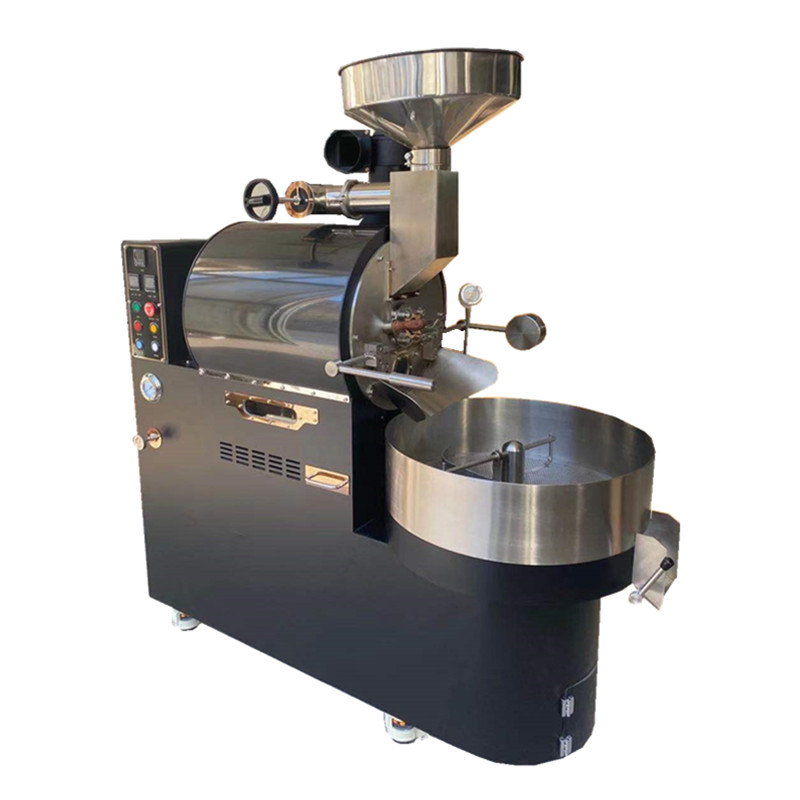
Optimizing Coffee Roasting Machines for Studio Environments: A Guide to Functional Integration
Designing a Dedicated Roasting Zone in Studio Spaces
Studios, whether for photography, art, or small-scale production, demand flexibility and efficiency. Integrating a coffee roaster begins with carving out a dedicated zone that balances accessibility with minimal disruption. Choose a corner or wall-adjacent area to isolate heat and noise, ensuring the roaster doesn’t interfere with other studio activities. If the studio has high ceilings, consider placing the machine on a sturdy table or raised platform to improve airflow and ergonomics.
Lighting plays a crucial role in monitoring roast color changes. Position the roaster near natural light sources or install adjustable LED task lights to illuminate the bean chamber without casting harsh shadows. Avoid placing the machine under direct overhead lighting, which can create glare on viewing windows or control panels.
Storage solutions are equally important. Use wall-mounted shelves or rolling carts to keep green beans, scales, and cooling trays within arm’s reach without cluttering the workspace. Label containers clearly to streamline workflow and prevent cross-contamination between bean varieties.
Ventilation and Air Quality Management in Enclosed Studios
Unlike kitchens, studios often lack built-in ventilation systems, making heat and smoke control critical. For small studios, install a portable exhaust fan near the roaster to draw away hot air and chaff. Position the fan at a 45-degree angle to the machine’s exhaust vent to maximize airflow without disrupting the roasting process.
If the studio has windows, use magnetic screen doors or adjustable vents to maintain airflow while keeping insects out. During long roasting sessions, open windows on opposite sides of the room to create cross-ventilation, which helps dissipate heat and odors faster. For odor control, place bowls of baking soda or activated charcoal near the roaster to absorb lingering coffee aromas.
Studios with sensitive equipment, like cameras or electronics, require extra caution. Avoid roasting near these items to prevent heat damage or dust accumulation. If space is limited, use a plexiglass partition to create a physical barrier between the roasting zone and other workstations.
Noise Control Strategies for Multi-Use Studios
Roasting machines generate vibrations and noise that can disrupt focused work in shared studios. To minimize sound, place the roaster on a thick rubber mat or anti-vibration pad, which absorbs shocks and reduces noise transmission to floors and walls. For studios with concrete or hardwood floors, add a layer of interlocking foam tiles beneath the mat for additional sound dampening.
If the studio is used for recording audio or video, schedule roasting sessions during off-peak hours or use soundproofing techniques like hanging acoustic panels on nearby walls. Position the roaster away from microphones or cameras to avoid picking up operational noise. For open-plan studios, use bookshelves or freestanding partitions to create acoustic buffers around the roasting area.
Regular maintenance also helps reduce noise. Lubricate moving parts like fans or motors according to the manufacturer’s instructions to prevent squeaking or grinding sounds. Empty the chaff collector frequently to avoid rattling noises caused by loose debris.
Ergonomic Workflow Integration for Efficiency
Studios thrive on efficiency, so the roaster’s placement should support a seamless workflow. Position the machine at a height that allows comfortable access to the bean chute, control panel, and cooling tray without excessive bending or stretching. A countertop height of 34–36 inches works well for most users, but adjustable-height stands can accommodate individual preferences.
If the roaster includes a viewing window, ensure it’s at eye level to simplify roast monitoring. This reduces the need to crouch or tilt the head, minimizing strain during long sessions. Place a scale and cooling tray directly in front of the roaster to streamline weighing and cooling processes.
For studios that double as tasting spaces, arrange seating and brewing equipment nearby to create a cohesive coffee station. Use a small side table or wall-mounted shelf to hold grinders, cups, and tasting notes, keeping the area organized and inviting.
Safety Considerations for Studio Environments
Studios often contain flammable materials like fabrics, paints, or wood, making fire safety a top priority. Keep the roaster at least three feet away from these items and install a smoke detector nearby. If the studio uses chemical solvents or aerosols, ensure they’re stored in a separate, well-ventilated area to prevent accidental ignition.
Electrical safety is equally important. Verify that the studio’s wiring can handle the roaster’s power requirements and avoid using extension cords, which can overheat or create tripping hazards. Install a ground-fault circuit interrupter (GFCI) outlet near the roaster to protect against electrical shocks, especially if the studio has water sources like sinks or wet bars.
For studios with children or pets, secure the roaster’s cord and place it out of reach to prevent accidental contact. Use cord clips or adhesive channels to keep cords tidy and avoid tangling with other equipment.
Customizing the Studio Experience with Roasting Accessories
Studios thrive on creativity, so incorporate accessories that enhance functionality without cluttering the space. Use magnetic strips or pegboards to hang roasting tools like brushes, scoops, and thermometers, keeping them visible and accessible. Install a small whiteboard or chalkboard near the roaster to track roast profiles, batch numbers, or tasting notes.
For studios that host clients or collaborators, add a decorative touch to the roasting zone with potted plants or artwork related to coffee culture. This creates a welcoming atmosphere while reinforcing the studio’s unique identity. If space allows, set up a small display area for packaged roasted beans or brewing equipment, turning the roaster into a focal point for conversation and education.
By thoughtfully integrating a coffee roaster into a studio environment, users can create a space that supports both creativity and craftsmanship without sacrificing safety or efficiency.