

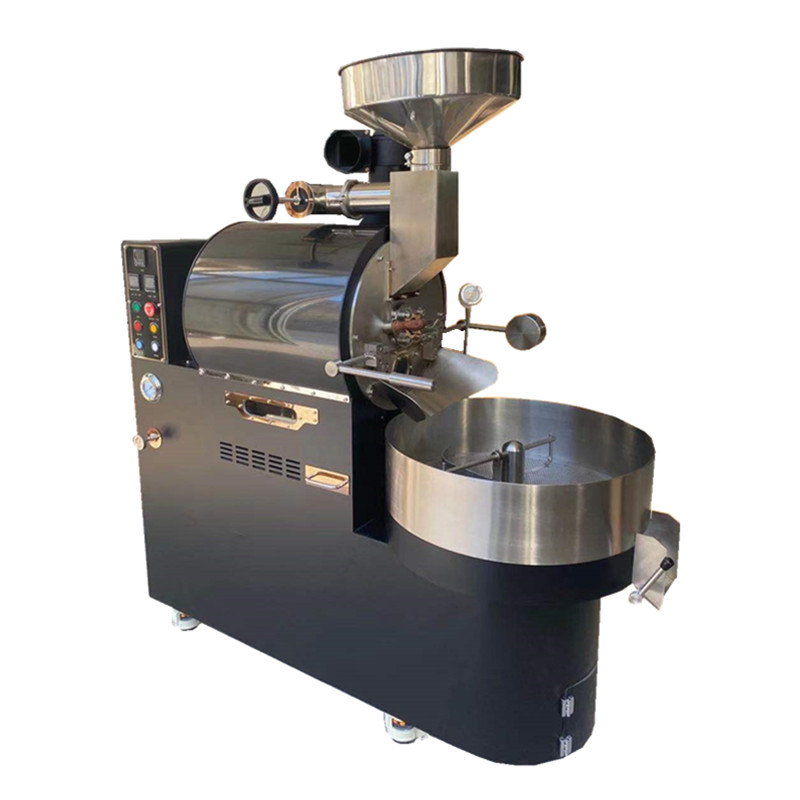
Coffee Roaster Component Replacement: A Guide to Maintaining Peak Performance
Coffee roasters rely on a network of interconnected parts to deliver consistent roast quality. Over time, components like heating elements, bearings, and sensors wear down, requiring replacement to avoid operational disruptions. Understanding when and how to replace these parts ensures your roaster operates efficiently. Below are key considerations for replacing common coffee roaster components, organized by category.
Identifying Worn-Out Electrical Components
Electrical failures are a leading cause of roaster downtime. Heating elements, thermocouples, and control boards are prone to wear, especially in high-usage environments. Recognizing signs of electrical degradation helps prevent unexpected breakdowns.
Heating Element Replacement
Heating coils or infrared bulbs are critical for temperature control. Symptoms of failure include:
- Inability to reach target temperatures
- Uneven roasting (e.g., one side of the drum heats faster)
- Visible damage like cracks or discoloration
To replace a heating element:
- Disconnect power and allow the roaster to cool.
- Access the element (often located beneath the drum or near the exhaust).
- Remove mounting screws or clips and disconnect wiring harnesses.
- Install the new element, ensuring proper alignment and secure wiring connections.
Example: A roaster struggling to maintain 450°F (232°C) despite normal power input may have a burnt-out heating coil. Replacing it restores consistent heat distribution.
Therocouple and Sensor Upgrades
Thermocouples measure drum temperature, while other sensors monitor airflow or exhaust. Signs of failure include:
- Erratic temperature readings on the control panel
- Roasts taking longer than usual
- Frequent error codes related to thermal regulation
To replace a thermocouple:
- Locate the sensor (usually inserted into the drum or attached to the exhaust).
- Disconnect the wiring plug and unscrew the mounting bracket.
- Clean the insertion point to remove residue.
- Install the new sensor, ensuring it’s seated firmly and wired correctly.
Example: A roaster displaying “Temp Sensor Fault” messages might need a new thermocouple. Calibrating the new sensor after installation ensures accuracy.
Mechanical Part Replacements for Smooth Operation
Mechanical components like bearings, belts, and gears ensure the drum rotates evenly and quietly. Wear and tear here can lead to vibrations, noise, or uneven roasting.
Bearing and Bushing Maintenance
Bearings reduce friction between moving parts, such as the drum shaft and motor. Symptoms of bearing failure include:
- Squealing or grinding noises during rotation
- Excessive vibration
- Visible play or looseness in the drum
To replace bearings:
- Disconnect power and remove the drum (if necessary).
- Access the bearing housing (often located at the drum’s ends).
- Use a bearing puller to remove the old bearing.
- Clean the housing and install the new bearing, applying food-grade grease.
Example: A roaster emitting high-pitched squeals during operation likely has dry or damaged bearings. Lubricating or replacing them eliminates noise and prevents further wear.
Drive Belt and Gear Adjustments
Belts transfer power from the motor to the drum, while gears ensure precise rotation. Signs of wear include:
- Slippage (drum rotates inconsistently)
- Cracks or fraying on belts
- Stripped teeth on gears
To replace a drive belt:
- Loosen the motor mount or tensioning bracket.
- Slide the old belt off the pulleys.
- Install the new belt, ensuring it sits correctly on all pulleys.
- Adjust tension to prevent slippage (refer to the manufacturer’s guidelines).
Example: A roaster with a loose drum might have a stretched belt. Tightening or replacing the belt restores smooth rotation.
Airflow and Ventilation System Upgrades
Proper airflow is essential for even roasting and smoke management. Clogged ducts, damaged fans, or worn seals can compromise performance.
Exhaust Duct and Vent Cleaning
Chaff and residue buildup in ducts restrict airflow, leading to:
- Prolonged roast times
- Uneven color development
- Excessive smoke during operation
To clean ducts:
- Disconnect power and remove access panels.
- Use a flexible brush or vacuum to remove loose debris.
- For stubborn buildup, wash ducts with warm, soapy water (ensure they’re dry before reinstalling).
- Replace damaged duct sections if cleaning isn’t sufficient.
Example: A roaster producing inconsistent batches might have clogged exhaust vents. Deep-cleaning the ductwork improves airflow and roast uniformity.
Fan Motor and Blade Replacements
Fans regulate airflow through the drum and exhaust. Signs of fan failure include:
- Reduced airflow (weak suction or exhaust)
- Unusual noises like rattling or humming
- Overheating motors
To replace a fan motor:
- Access the fan housing (often located near the exhaust or drum).
- Disconnect wiring and remove mounting screws.
- Install the new motor, ensuring proper alignment and secure wiring.
- Test the fan to confirm smooth operation.
Example: A roaster with weak exhaust flow might have a failing fan motor. Replacing it restores optimal ventilation.
By addressing these component replacements proactively, coffee roasters can minimize downtime and maintain consistent roast quality. Regular inspections and timely part swaps extend the lifespan of your equipment, ensuring it operates at peak efficiency.