

Pre-Operation Setup and Safety Checks
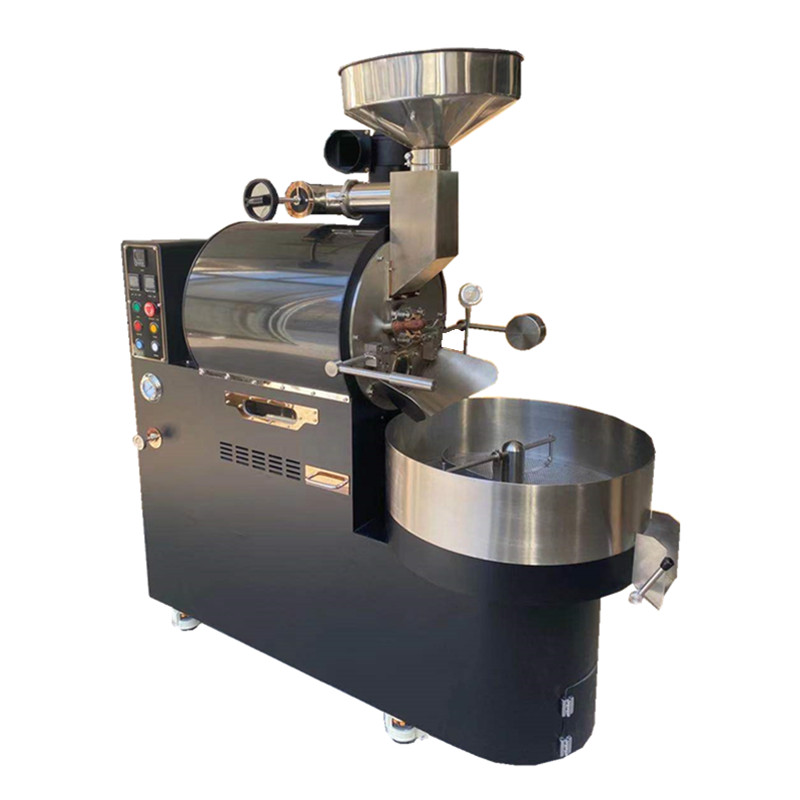
Before powering on the coffee roaster, ensure the machine is placed on a stable, heat-resistant surface with adequate ventilation. Inspect the roasting chamber, bean inlet, and exhaust system for obstructions or residue from previous batches. Verify that the cooling tray and bean collection container are securely positioned. For models with adjustable heat or airflow settings, confirm that dials are set to the default “off” position. If the machine includes a digital interface, check for error messages or maintenance alerts. Wearing heat-resistant gloves and safety goggles is recommended to protect against hot surfaces and flying debris during operation.
Step-by-Step Roasting Process
Start by preheating the roaster to the desired temperature, typically between 180°C and 220°C, depending on the bean origin and roast profile. While heating, measure the coffee beans using a scale for consistency—common batches range from 250g to 1kg. Once preheated, load the beans into the roasting chamber through the inlet, ensuring even distribution. Close the chamber securely and initiate the roasting cycle. Monitor the beans through a viewing window or via real-time temperature sensors, adjusting airflow or heat as needed to control the rate of rise (RoR). Listen for the “first crack,” a critical audible indicator of light to medium roast development, and the “second crack” for darker roasts.
Post-Roasting Cooling and Cleaning
Immediately after roasting, activate the cooling system to halt the roasting process and prevent overheating. Transfer the beans to a cooling tray or use the machine’s integrated cooling function, stirring occasionally to ensure even temperature reduction. Once cooled, separate the chaff from the beans using a sieve or dedicated chaff collector. Dispose of chaff responsibly to avoid clogging vents. Clean the roasting chamber, bean inlet, and cooling tray with a soft brush or vacuum to remove residual oils and particles. For models with removable parts, wash them with mild detergent and dry thoroughly before reassembling. Regularly inspect and clean the exhaust system to maintain optimal airflow.
Troubleshooting Common Issues
Uneven roasting may result from inconsistent heat distribution or improper bean loading. To resolve this, ensure beans are spread evenly in the chamber and adjust airflow settings. If the machine overheats or triggers safety shutoffs, reduce the heat input and verify that ventilation pathways are clear. For models with digital controls, recalibrate temperature sensors if readings appear inaccurate. Persistent chaff buildup in the exhaust could indicate a clogged filter; replace or clean it according to the manufacturer’s guidelines. Always consult the user manual for model-specific troubleshooting steps before attempting repairs.